

I have been driving long haul for over two decades. For most of that time, I thought the lower back pain was just part of the job, the same way a roofer gets sore knees or a nurse gets aching feet. You get in, you sit, your back slowly locks up somewhere around hour four, and you get out at the dock feeling about fifteen years older than you are. What I did not realize until I finally started paying attention was that the pain was not caused by driving. It was caused by the way I was sitting while driving. The seat, the angle, the total absence of anything supporting the natural curve in my lumbar spine. Every mile was compressing the discs and fatiguing the muscles in my lower back because nothing was holding that curve in place. A quality lumbar support pillow, positioned correctly, changes the mechanics of sitting so dramatically that it almost feels like cheating. But getting it right requires more than just slapping a pillow behind you and calling it done. There is a specific setup sequence that makes the difference between real relief and a pillow that ends up on the passenger seat by lunch.
The QUTOOL lumbar support pillow is what I landed on after going through four other options. Memory foam core, dual adjustable straps that actually hold position in a truck seat, and a contour designed to sit at the lumbar region, not mid-back where most cheap pillows drift to. With 26,000-plus Amazon reviews and a 4.4 rating, it is not a secret. But using it correctly is a skill, and that is what this guide is for. I am going to walk you through the exact five steps I use every time I get behind the wheel.
Your back has been taking the hit for your seat position. Fix it today.
The QUTOOL lumbar support pillow fits truck seats, car seats, and office chairs. Dual adjustable straps keep it locked where you need it, not sliding to mid-back by mile fifty. Over 26,000 reviews. Check today's price on Amazon.
Amazon Check Today's Price on Amazon →Step 1: Set Your Seat Distance Before You Touch the Pillow
Most drivers set their seat by reaching the pedals and stop there. That is a mistake. If your seat is too far back, you naturally round your lower back to reach forward, negating everything a lumbar pillow can do. Before you add any support, get your seat distance right. Slide forward until your knees are bent at roughly 90 degrees and your feet rest flat on the pedals without stretching. You should not have to lean forward from your hips to reach the wheel. If you do, the seat is still too far back. With a steering wheel that tilts, pull it slightly toward you and angle it so your arms are relaxed at roughly 10 and 4 o'clock, not reaching up at 10 and 2 like a school test. This base position lets the lumbar support actually work. Without it, you are fighting your own reach mechanics for the next ten hours.
One more thing to check at this step: seat tilt. A lot of truck seats have a cushion tilt adjustment that most drivers leave flat. Tilt the seat pan very slightly forward, maybe two degrees. That small angle shifts your pelvis into a slight anterior tilt, which re-establishes the natural lumbar curve before you even add a pillow. Think of it as preloading the curve rather than trying to force it in after the fact. Takes about ten seconds. Skipping it means the pillow has to do work it was not designed to do alone.
Step 2: Find the Lumbar Notch and Place the Pillow There
This is the step everybody gets wrong. The lumbar region is not your mid-back. It is the inward curve that sits between the top of your pelvis and the bottom of your rib cage, roughly at belt level. When you are seated, that curve naturally wants to flatten against the seatback. Your lumbar support pillow needs to sit right there, filling that gap. To find it: sit up straight, place your hand at the small of your back, and feel where the natural inward curve is. That is where the center of the pillow goes. For most people in a truck seat this lands somewhere between 4 and 6 inches above the seat cushion itself. Way lower than most people put it.
With the QUTOOL, route the straps through or around the seat headrest posts or over the seat back, then tighten snugly so the pillow cannot shift up or down with road vibration. The pillow should feel like it is pressing forward into your lumbar curve, not pushing your shoulders off the seatback. If your shoulder blades are lifting away from the seat, the pillow is too high. Slide it down half an inch at a time until the curve feels supported but your upper back still contacts the seat naturally.
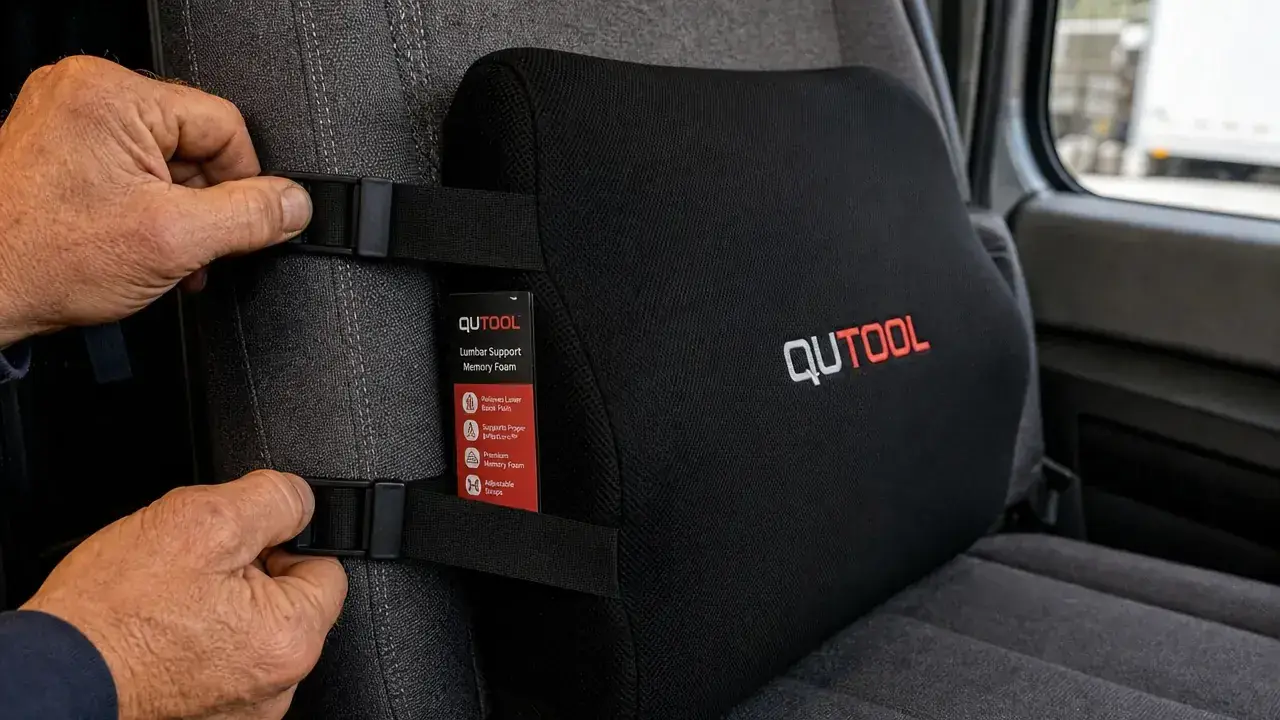
Step 3: Check Your Head and Hip Alignment After Placement
Once the pillow is positioned and the straps are tightened, sit back into it and check three contact points: the back of your head, your shoulder blades, and your lower back. All three should be touching the seatback or the pillow without you forcing the position. If your head is floating forward off the headrest, the pillow is probably sitting too high and tipping your upper body forward. If you feel pressure only in one spot of your lower back, adjust the pillow's horizontal position left or right until it sits centered on your spine.
Check your hips too. When the lumbar support is doing its job, your pelvis will rock into a slight forward tilt and your sitting bones will bear more of your weight evenly. That takes load off the discs. If you still feel like you are sitting on your tailbone and rounding under, the seat distance from Step 1 is probably still off. Go back to that before blaming the pillow. Alignment is a system, not a single piece.
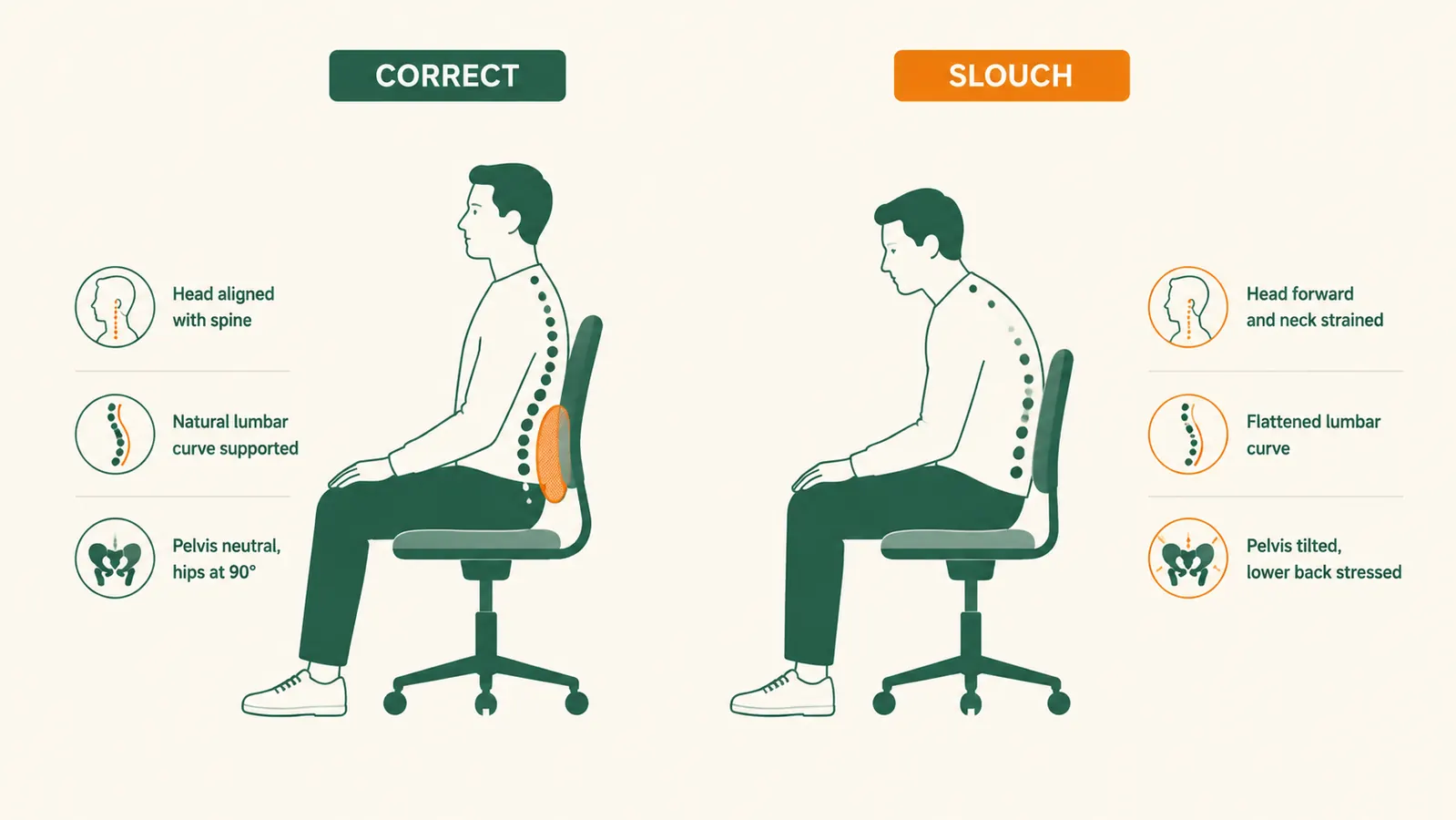
Step 4: Adjust Firmness for Your Load and Your Mileage
Memory foam responds to body heat and pressure, which means the pillow will feel different at the start of a shift versus hour eight. In cooler temperatures or at the start of the day, memory foam is stiffer. That is actually fine for the first few hours because your muscles are fresher and can work with the feedback. As the foam warms and softens slightly, it conforms more and provides a gentler, more passive support. This is by design. Where drivers get into trouble is in summer when the cab heats up so much that the foam goes very soft too early in the trip. If you run without AC or park in direct sun, the pillow can lose support within an hour. The fix is straightforward: keep a small towel between the pillow cover and the seatback to slow the heat transfer, or crack a window long enough to drop the cab temperature before you sit down.
If you have a particularly long run, more than seven or eight hours of continuous sitting, consider briefly removing the pillow at a rest stop and allowing it to re-expand fully. Memory foam that has been under consistent load for several hours will have compressed slightly. A fifteen-minute break lets it decompress, and you get the full support benefit again when you return. This also lines up naturally with the movement breaks in Step 5.
Step 5: Build Movement Breaks Into Every Two-Hour Window
A lumbar support pillow reduces the mechanical load on your spine while seated. It does not eliminate it. No passive device removes the need for movement entirely, and if you are treating the pillow as a substitute for breaks rather than a complement to them, you will still wind up with a locked-up back. The rule I follow is one deliberate break for every two hours behind the wheel. At minimum, that means getting out of the cab, walking fifty steps, and doing a quick low-back rotation: hands on hips, gentle rotation left and right, ten reps each direction. Takes ninety seconds. The difference it makes over an eight-hour run is substantial.
At fuel stops or loading docks, I add a standing hip hinge: feet shoulder-width apart, hands on the top of the truck tire, hinge forward at the hips with a flat back until I feel a stretch in the hamstrings, hold ten seconds, repeat three times. This decompresses the lumbar spine after it has been loaded in flexion for hours. The pillow maintains the curve while you sit. The hip hinge restores disc spacing after you have been sitting. Together, they cover what either one alone cannot.

What Else Helps
The lumbar support pillow handles the structural problem: the collapse of your lumbar curve under sustained compression. But lower back pain in drivers usually has a few other contributors worth addressing. Tight hip flexors are one of the biggest. Sitting for long periods shortens the hip flexor muscles, which then pull the pelvis into an anterior tilt beyond what is helpful, increasing lumbar extension and loading the facet joints. A basic hip flexor stretch at every fuel stop, a simple low lunge where you step one foot forward and drop the rear knee toward the ground, takes about twenty seconds per side and chips away at that tightness over time.
Core activation is the other piece most drivers ignore. The lumbar support does the work when you are passively seated, but activating your core muscles during driving, even at a low level, provides an internal support system that a pillow cannot replicate. The practice is simple: during straight sections of highway, take a breath in, exhale slowly, and gently draw your navel toward your spine at about 30 percent of maximum effort. Hold for a few seconds, release, repeat. You are not sucking in your gut. You are gently bracing the deep core muscles that wrap around the lumbar spine. Done consistently during long stretches, this builds the habit and strengthens the muscle pattern that protects your back at every stop.
Finally, hydration plays a role that most people underestimate. The intervertebral discs between your lumbar vertebrae are largely fluid-filled. They depend on hydration to maintain their height and shock-absorbing capacity. Chronic dehydration, which is extremely common in drivers who limit fluids to reduce bathroom stops, results in disc compression that makes lumbar pain significantly worse. One cup of water per hour of driving is a reasonable target that most drivers find manageable with a standard rest stop schedule. Small adjustment, meaningful result over a career.
The pillow maintains the curve while you sit. The movement break restores disc spacing after you have been sitting. One without the other only solves half the problem.
If you want more detail on what the QUTOOL specifically offers versus other lumbar supports on the market, the full breakdown is in our six-month QUTOOL lumbar pillow review. And if you are still deciding whether a lumbar support pillow is the right tool for your situation or whether a back brace might serve you better, the 10 reasons lumbar support helps truck drivers breaks down the specific mechanisms. Short version: for in-seat support during long drives, the pillow wins. For unloading at the dock where you are lifting and bending, a brace has a role. Most regular haul drivers wind up using both.
Stop writing off the back pain as part of the job. It is fixable.
The QUTOOL lumbar support pillow is budget-friendly, fits truck and car seats, and takes about two minutes to set up correctly using the steps above. Memory foam, dual adjustable straps, and a shape built specifically for the lumbar curve, not mid-back. Over 26,000 drivers and seated workers have reviewed it. Check today's price before your next run.
Amazon Check Today's Price on Amazon →